You’ve probably used ChatGPT: you type a question, and the AI replies with an explanation, an email draft, or an idea for dinner. At some point you might wonder: the advice is great, but could it handle the next part for me, too?
Say you want to get friends together for a weekend walk. Instead of letting the meeting time drown in the group chat, you decide to make an invitation webpage. Now what you need is very specific: a page you can open and edit.
In everyday English, an agent is someone who acts on your behalf, like a travel agent. In this tutorial, an Agent is the AI version: an AI system that works toward a goal by using tools, checking the results, and keeping the task moving in its work environment. You tell it what you want, and it figures out the next step and actually does it.
From talking it through to getting it built
Let’s stick with the invitation page and compare two ways of working:
Chat is great for explaining, discussing, and brainstorming. Working with an Agent hands the “keep going” part to the AI, too: it might ask about the meeting time first, then write the file, test the button, and keep fixing things when it spots a problem. You don’t have to walk it through “now open the file” and “now change line three” one step at a time.

ChatGPT is a product name, while “chat” and “Agent” describe the ways of working we’re comparing here. One product can support both: ChatGPT also offers an Agent mode, for example. A chat box doesn’t mean all it can do is chat. And having search or image generation doesn’t mean every question you ask turns into an ongoing task.
To tell which is which, look at what it can do this time, what it actually did, and where the result ended up.
Tools and environments: how it gets hands-on, and where
An AI writing “I’ve finished the webpage” doesn’t make a file appear. To actually put the content into a file, it needs tools.
Tools let the AI take concrete actions. For example:
- Reading and writing files: reading the materials you already have, saving the invitation page as
index.html, then changing the meeting time. - Using a browser: looking things up, or, when it has the right abilities, opening the page to check how it looks.
- Running programs: working with spreadsheets, crunching numbers, or checking a webpage for errors.
Where these actions happen is its work environment. That could be your own computer, a cloud computer, or a connected browser or business system. Different Agents get different tools and access, so they can do different things.
On Agent.Space, we put this project in a cloud Workspace: you make requests in your browser, and the Agent works on the files in the cloud. For your first invitation page, you don’t need to install a set of developer tools on your own computer. As for how files get saved and how to pick up where you left off, Chapter 4 will show you around.
Keeping at it: do a step, take a look
An Agent usually doesn’t stop once it has laid out a plan. At each step, it looks at what actually happened and decides what to do next:
- Look at the goal and materials: Who’s invited? What time do we meet? What’s still missing?
- Pick an action and use a tool: create the webpage and write in the event details.
- Check the result: Did the file save? Did the check turn up any problems?
- Keep going or adjust: add the missing location, fix the button; when a decision is yours to make, come back and ask you.
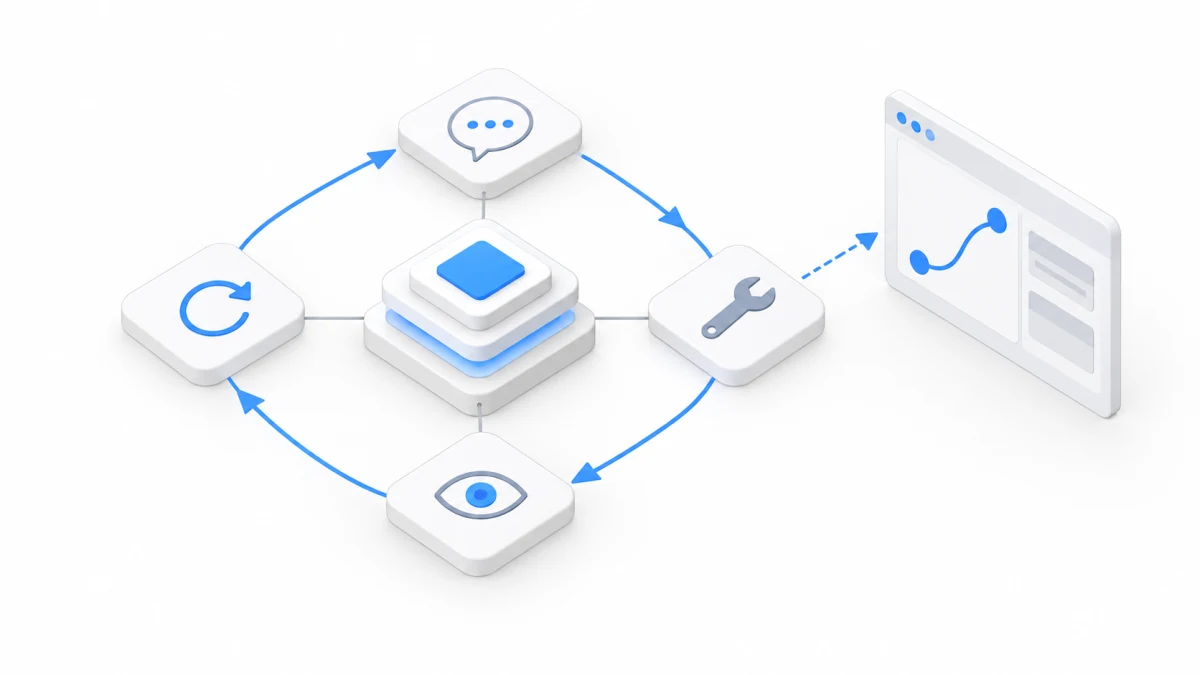
That’s what “keeping at it” means: finishing several steps in a row toward the same goal. Longer tasks can also leave behind files and progress, so they can carry on in an environment that supports picking back up.
It still stops sometimes: the work is done, it needs more information from you, it hits a permission or usage limit, or something fails. Being able to keep going doesn’t mean every program stays online forever. When you come back, check where things stand first, then decide what’s next.
Memory and experience: less explaining next time
You just said “keep the tone light,” and the copy that follows gets more casual. That’s usually because your words are still in its current context: the conversation, materials, and tool results it can see while working on this task.
But a few days later, in a new conversation, will it still know? That depends on whether the information was saved and gets read again when it’s needed.
Think of memory as notes left for later. Depending on how they’re set up, some Agent products save preferences, feedback, or project knowledge and use them in later tasks; see how memory works in Claude Code, for example. What gets remembered, where it’s kept, and which conversations can use it all depend on the product.
For our invitation page, an easy approach is to ask the Agent to write the confirmed plans into a project note: the event is beginner-friendly, people can rest when they get tired, and the meeting spot is settled. Next time, have it read that note first, and you skip a round of re-explaining. On Agent.Space, files in the Workspace stay saved, and a new conversation or a different Agent can still read them, so “write it down in a file” is the most reliable way to remember.
Experience goes one step further: hang on to the good approaches you discover along the way. Say you notice that a meeting time buried in a long paragraph is easy to miss; once you move it right under the heading, your friends spot it at a glance. You can write down “put key info up front, and check at phone width when you’re done” for the next event page to use.
This kind of learning comes from saving information and using it again. It doesn’t mean the model gets retrained every time you chat. Decisions in your notes can go out of date, so double-check anything important. And a new Agent won’t automatically know everything from other conversations.
Skills: put good habits in a little handbook
If you make event pages often, there’s no need to explain the whole process from scratch every time. Instead, you can package a reliable approach that works into a Skill.
Think of it as a how-to handbook written for the Agent: when to use it, which steps to follow, and how to check the work. Picture an “event invitation page” handbook. It might say: confirm the time and place first, then lay out the content, and finally check the phone layout and the join button. It can also come with templates, examples, or small programs that help get the job done.
In products that support Skills, an Agent can read the handbook when a task calls for it, and you can also tell it to use a specific Skill. A common Agent Skills format keeps the instructions in a SKILL.md file. For now, it’s enough to know what Skills are for; you don’t need to learn to write that file yet.
On Agent.Space, “Plugins” in the left sidebar is where these handbooks and tools live: you can search for and install Skills other people have put together, or connect other services. Install once, and every Agent in the Workspace can use it. “Web Builder,” the plugin that handles making webpages, is one of the built-in ones.

Here’s how the invitation page keeps the three words apart: tools do the actual editing of files; memory can hold “this event is beginner-friendly”; a Skill supplies the method, like “which details to confirm first when making an event page.” A Skill’s instructions may guide how tools are used, but which tools are actually available and which files it can access still depend on the current environment and permissions.
So yes, with memory and Skills, an Agent can get handier over time, but those abilities need the right support. For your first webpage, a clearly explained task is all you need to get started.
First time working together? You call the shots
You’re still the one who knows why this event is happening in the first place. The Agent might turn “a casual stroll” into something that sounds like boot camp. Add one line, “We just want some fresh air. Nobody’s tracking their pace,” and it has a much clearer direction.
The first time you hand over a task, just make three things clear: what you want to end up with, what materials you have, and what counts as done. For example: make an invitation page; use the time and route you gave it; save it as a file that reads well on a phone, with a button that works.
Then go back to the result and check it: Does the file open? Is the info right? Did the things you asked to change actually change? This back-and-forth will get you further than hunting for one “magic prompt.”
In the next chapter, we’ll sort out the models and Harnesses behind all this. Once you know how these parts work together, new names are a lot less dizzying.
For a more formal explanation, check out Hugging Face’s introduction to Agents and Anthropic’s explanation of how Agents work in a loop. The walk example and practice story here are original to Agent.Space.